Imagine pulling into a weigh station only to discover your CDL was downgraded because of a simple paperwork delay. For many Florida drivers, the fear of losing their license due to a clerical error is a constant source of anxiety. Understanding exactly how to submit DOT medical card to Florida DMV systems is essential, especially with the 2026 regulatory landscape requiring more digital precision than ever before. While medical examiners now transmit exam results to the federal registry, you are still responsible for ensuring the FLHSMV correctly updates your driving record and recognizes your self-certification status.
We recognize that navigating government portals and choosing between Tier 1 and Tier 2 certification can be frustrating. You’ve worked hard for your career, and you shouldn’t have to worry about technical glitches or confusing forms. This guide provides a clear, updated roadmap to help you maintain compliance and secure your medical status. We’ll cover the latest electronic submission rules, the specific steps for the MyDMV Portal, and how to verify your information so you can get back on the road with total peace of mind.
Key Takeaways
- Understand the 2026 relationship between federal FMCSA standards and Florida state enforcement to ensure your CDL remains in good standing.
- Master the step-by-step process of how to submit DOT medical card to Florida DMV using the MyDMV Portal for a secure and efficient update.
- Identify backup submission methods, including the dedicated 2026 FLHSMV email and fax lines, for times when digital portals are unavailable.
- Learn how to verify your updated status through the Driver License Check tool and troubleshoot common “Not-Certified” error labels.
- Plan for long-term compliance by scheduling your next physical with a qualified provider at least 30 days before your current medical certificate expires.
Understanding Florida CDL Medical Requirements in 2026
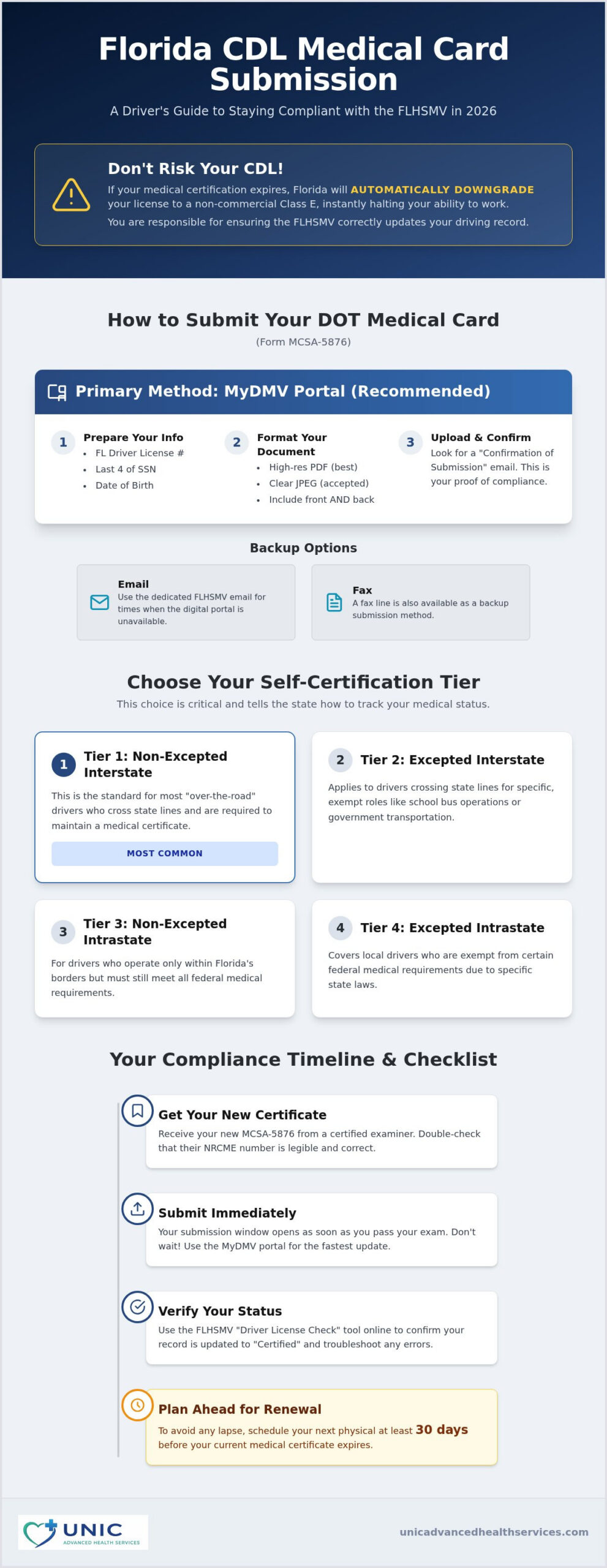
Professional drivers understand that maintaining a valid Commercial Driver’s License (CDL) requires a clear understanding of both federal and state mandates. While the Federal Motor Carrier Safety Administration (FMCSA) sets the clinical health standards for your physical, the Florida Department of Highway Safety and Motor Vehicles (FLHSMV) enforces these rules at the state level. You only need to provide the Medical Examiner’s Certificate, known as Form MCSA-5876, to the state. Although you may hear about a 15-day grace period for processing, the reality of modern enforcement means you should aim for immediate updates. If your medical certification expires, Florida will automatically downgrade your license to a non-commercial Class E status, which can halt your ability to earn a living instantly.
To better understand the various ways you can handle your paperwork and ensure you remain compliant, watch this helpful video:
The Four Tiers of Florida Self-Certification
Florida requires every driver to select a self-certification tier that reflects their specific type of commercial work. This choice determines how the state tracks your medical status and whether a medical card must be kept on file. Many drivers find this step confusing, but it’s a critical part of knowing how to submit DOT medical card to Florida DMV records successfully.
- Tier 1: Non-Excepted Interstate. This is the standard for most “over-the-road” drivers who cross state lines and are required to maintain a medical certificate.
- Tier 2: Excepted Interstate. This applies to drivers crossing state lines for specific, exempt roles like school bus operations or government transportation.
- Tier 3: Non-Excepted Intrastate. This is for drivers who only operate within Florida borders but still meet all federal medical requirements.
- Tier 4: Excepted Intrastate. This tier covers local drivers who are exempt from certain medical requirements due to specific state laws.
When Does Your Submission Window Open?
You don’t need to wait until your current card expires to update your records. In fact, waiting until the last minute is a significant risk to your livelihood. Your submission window opens as soon as you receive your new MCSA-5876 from a certified examiner. Before you upload your documents, double-check that your examiner’s National Registry of Certified Medical Examiners (NRCME) number is legible and correct. If you’re preparing for an upcoming appointment, you can review our DOT Physical Exam Fort Lauderdale guide to ensure you have everything ready for a successful, stress-free evaluation.
How to Submit Your DOT Medical Card Online via MyDMV Portal
The Florida Department of Highway Safety and Motor Vehicles (FLHSMV) has transitioned to a digital-first approach for 2026. While several methods exist, the MyDMV Portal is the most efficient way to ensure your records are updated in real time. Learning how to submit DOT medical card to Florida DMV systems through this portal allows you to maintain control over your compliance without waiting for manual mail processing. Before you begin, ensure you have your Florida driver license number, the last four digits of your Social Security Number, and your date of birth ready to verify your identity. The portal uses these data points to link your medical certificate directly to your commercial driving record.
Document formatting is a common area where drivers encounter technical hurdles. For 2026, the FLHSMV recommends using high-resolution PDF files, though clear JPEG images are still accepted. Regardless of the format, the file must be legible and include both the front and back of your MCSA-5876 certificate. If the text is blurry or the examiner’s signature is cut off, the system may reject the upload during the manual review phase. Once the upload is complete, you must look for the “Confirmation of Submission” email. This digital receipt is your primary defense if a discrepancy arises later, so save it in your records immediately.
Step-by-Step Portal Navigation
Once you are logged into the MyDMV Portal, look for the “Driver License Update” or “CDL Self-Certification” section. This area is dedicated to maintaining the federal standards outlined in the FMCSA medical requirements. You’ll be prompted to enter specific details from your medical card, including the Medical Examiner’s name, their National Registry number, and the certificate expiration date. Accuracy is vital here; the portal cross-references this data with federal databases. After entering the text, you will reach the upload screen where you can attach your prepared files. Double-check that you’ve selected the correct tier, as discussed in the previous section, before hitting the final submit button.
Common Online Upload Pitfalls
Technical errors can be stressful when your livelihood is on the line. Most portal rejections stem from file size limits, which are typically capped at 5MB per document. If your scan is too large, use a basic PDF compressor to reduce the size without sacrificing clarity. If the portal doesn’t recognize your license number, ensure there are no extra spaces in the input field and that your address matches what the DMV has on file. If you’re still facing issues, it might be time to consider an appointment with a provider who understands the intricacies of the process. You can find expert guidance and same-week appointments for your DOT physical in Fort Lauderdale to ensure your paperwork is in perfect order before you attempt the upload.
Alternative Submission Methods: Email, Mail, and Fax
While the digital portal is the preferred route, technology isn’t always perfect. If you encounter a system outage or a persistent login error, you need to know how to submit DOT medical card to Florida DMV officials through alternative channels. Relying on a single method can be risky when your CDL status is at stake. In 2026, the state continues to offer email, mail, and fax options, though each carries different processing times and reliability levels. Email is generally the most effective backup, while faxing has become increasingly prone to transmission errors and is now considered the least reliable choice for professional drivers.
For those who prefer a physical paper trail, you can mail your certificate to the Bureau of Motorist Compliance in Tallahassee. The primary drawback here is the significant delay. Paper documents often take two to four weeks to be manually entered into the system. If you choose this route, always use a tracking service like USPS Certified Mail. This provides legal proof that your documents reached the Neil Kirkman Building, offering you protection if your license is accidentally downgraded during the processing window. We recommend this only as a last resort due to the high risk of a status lapse while the mail is in transit.
Email Submission Best Practices
Submitting your medical card via email is a fast alternative when the portal is unresponsive. To ensure a DMV clerk processes your file quickly, your subject line must be precise. Use a format such as “Medical Certificate, [Your Full Name], [Your CDL Number].” This allows the automated sorting systems to route your email to the correct department without delay. It’s vital to include your contact information in the body of the message and attach your certificate as a clear PDF. It’s also a smart practice to request a read receipt, which provides a digital timestamp of when the FLHSMV opened your correspondence for your personal records.
In-Person Submissions at Local Tax Collector Offices
In most cases, local tax collector offices in Fort Lauderdale will direct you back to the online portal to save time. However, an in-person visit becomes mandatory if your license has already been downgraded to a Class E license. If you find yourself in this situation, you’ll need to bring your physical MCSA-5876 certificate and your driver license to a Broward County Tax Collector location. While this is the most time-consuming method, it allows for immediate verification and helps you resolve complex status issues that automated systems can’t always handle. We suggest calling ahead to confirm that your specific branch can handle CDL medical updates to avoid a wasted trip during your busy work week.
Verifying Your Status and Troubleshooting Errors
After you have followed the steps on how to submit DOT medical card to Florida DMV, the final stage is confirming that the state has accepted your documentation. You shouldn’t assume the process is complete just because you clicked “submit” or sent an email. Instead, use the FLHSMV ‘Driver License Check’ tool to monitor your record. This online resource provides immediate transparency regarding your current standing. If you see a ‘Certified’ status, your medical information is successfully logged. However, a ‘Not-Certified’ label indicates that your medical certificate has either expired or hasn’t been processed yet, putting your CDL at risk of an immediate downgrade.
Most digital submissions update within 72 hours. If your status remains unchanged after this window, you must take proactive steps. One common hurdle is the ‘Medical Examiner Not on National Registry’ error. This occurs when the NRCME number you entered doesn’t match the federal database or if there’s a typo in the examiner’s credentials. When this happens, the system cannot verify the legitimacy of your physical. It’s essential to cross-check the number on your MCSA-5876 certificate against the FMCSA registry to identify where the disconnect lies.
The ‘Pending’ Status: What Does It Mean?
The ‘Pending’ status is a temporary hold while a clerk verifies the NRCME credentials. This status often appears when you’ve selected a self-certification tier that requires additional manual oversight. If your record stays in this state for more than a few business days, you can contact the CDL Help Desk in Tallahassee directly to request an update. They can often provide specific details on what is causing the delay and whether you need to provide additional clarification regarding your driving category.
Correcting Submission Errors
Mistakes happen, especially when you’re rushing to meet a deadline. If you realize you entered the wrong expiration date or if your initial upload was rejected because the text was illegible, don’t panic. You can typically re-submit your documents through the same portal or email channel you used previously. Ensure your new scan is high-contrast and that all four corners of the card are visible. For drivers who want to avoid these technical headaches entirely, choosing a provider who understands the nuances of the 2026 regulations is a smart move. You can access our Occupational Health Exam Fort Lauderdale guide for more support on maintaining your professional compliance. To ensure your paperwork is handled correctly the first time, schedule your compliant DOT physical today with our expert team.
Next Steps: Staying Compliant with Unic Advanced Health Services
Maintaining your CDL status is an ongoing commitment rather than a one-time task. While you now understand the mechanics of how to submit DOT medical card to Florida DMV systems, the most effective way to avoid a license downgrade is to stay ahead of the calendar. We recommend scheduling your next physical at least 30 days before your current certificate expires. This buffer provides ample time to address any medical concerns or technical issues with the FLHSMV portal without risking your livelihood. Being proactive ensures that your driving record remains “Certified” even if there are unexpected delays in state processing.
At Unic Advanced Health Services, we act as your dedicated partner in professional compliance. Marc Joseph is an autonomous nurse practitioner with deep expertise in occupational health and federal safety standards. When you pass your exam, our clinic provides the required Medical Examiner’s Certificate (Form MCSA-5876) immediately. We ensure all information, including the NRCME number and expiration date, is clearly legible to prevent the common upload rejections discussed earlier in this guide. To support your long-term career, we also provide automated reminders to our patients, ensuring you never miss a 1-year or 2-year renewal window.
Comprehensive Care for Commercial Drivers
Our approach focuses on long-term health strategies that keep you on the road safely. We specialize in chronic condition management, helping drivers control hypertension and diabetes to qualify for the maximum 2-year certification period whenever possible. To make your visit efficient, we offer on-site lab services in Fort Lauderdale for faster results. We also provide Saturday appointments to accommodate the demanding and often unpredictable schedules of long-haul and local drivers alike. This flexibility ensures you can receive expert care without sacrificing valuable time behind the wheel.
Book Your Next DOT Physical in Fort Lauderdale
Our facility is designed for modern efficiency and individualized care. In addition to standard CDL exams, we offer U.S. Coast Guard (USCG) Boat Captain Physicals for maritime professionals in the South Florida area. When you arrive for your appointment, please bring your current driver license, a list of current medications, and any recent specialist clearances for chronic conditions. Taking these proactive steps ensures a smooth evaluation and a faster path to receiving your updated medical card. Schedule your DOT Physical with Marc Joseph, NP to secure your professional future with a team that values your peace of mind and professional longevity.
Securing Your Professional Future on the Road
Navigating the regulatory landscape of 2026 doesn’t have to be a source of constant stress. By mastering the MyDMV Portal and selecting the correct self-certification tier, you protect your career from unnecessary interruptions. It’s vital to remember that verifying your status through the FLHSMV check tool is just as important as the initial upload. If you’ve been searching for how to submit DOT medical card to Florida DMV records with confidence, remaining proactive is your best strategy for long-term success.
At Unic Advanced Health Services, we provide a steady hand to guide you through your compliance journey. Marc Joseph, NP, offers expert clinical care with the convenience of same-week appointments and comprehensive occupational health support. We ensure you leave your physical with the precise documentation needed to keep your driving record in good standing. Schedule your DOT Physical in Fort Lauderdale with Unic Advanced Health Services to experience a partnership built on reliability and thoroughness. You’ve worked hard for your CDL, and we’re here to help you keep it. Safe travels.
Frequently Asked Questions
How long does it take for the Florida DMV to process my medical card?
Digital submissions through the MyDMV Portal generally process within 72 hours. If you choose to mail your certificate to Tallahassee, expect a significant delay of two to four weeks for manual data entry. We recommend checking your status online regularly during this period to ensure no clerical errors occurred. Proactive monitoring helps you avoid the anxiety of a last-minute license downgrade. Our practice in Fort Lauderdale emphasizes the importance of this follow-up to maintain your professional standing.
Can I drive while my medical card submission is ‘pending’?
You can continue to drive as long as your previous medical certificate has not reached its expiration date. However, if your old card expires while your new submission is still in a “pending” status, you are technically non-compliant and could be disqualified. To avoid this risk, schedule your exam with Marc Joseph, NP, at our Fort Lauderdale clinic well before your current deadline. This buffer ensures your record updates before your legal authority to drive lapses.
What happens if I forget to submit my medical card to the Florida DMV?
If you fail to update your medical records, the FLHSMV will automatically downgrade your CDL to a non-commercial Class E license. This change happens immediately upon the expiration of your previous card. You’ll lose your commercial driving privileges and may face significant fees or testing requirements to reinstate your license. Understanding how to submit DOT medical card to Florida DMV systems correctly is the only way to prevent this professional and financial setback.
Does my doctor automatically send my medical card to the DMV?
In Florida, the driver carries the final responsibility for ensuring the state driver record reflects their current medical status. While medical examiners are required to upload results to the federal National Registry, this does not always trigger an immediate update at the state level. At Unic Advanced Health Services, we provide your MCSA-5876 certificate immediately after your exam so you can manage your state-level compliance without any unnecessary delays or technical gaps.
What is the email address to send my DOT medical card to the FLHSMV?
You should send your documentation to the official FLHSMV medical certification email address if the primary portal is unresponsive. While the state has moved toward automated electronic data transfers, this email serves as a vital backup for drivers facing technical hurdles. Ensure your certificate is attached as a clear PDF and include your license number in the subject line. This simple step helps the Medical Review Section process your information without unnecessary administrative delays.
Can I submit my medical card at a local Florida Tax Collector’s office?
Local Tax Collector offices in Fort Lauderdale typically prefer that you use the online MyDMV Portal for routine updates. However, if your license has already been downgraded, an in-person visit becomes mandatory to reinstate your commercial privileges. You should bring your physical medical card and your driver license to the office. It’s often helpful to call the Broward County office first to confirm they can process your specific medical certification update and check their current appointment availability.
How do I know if the Florida DMV accepted my medical card?
You can verify that the state accepted your card by using the FLHSMV “Driver License Check” tool. Enter your license number to view your current standing and look for the “Certified” status label. If the system still shows you as “Not-Certified” after 72 hours, you should contact the CDL Help Desk immediately. This proactive step is essential for your peace of mind and ensures you aren’t blindsided by a paperwork error during a roadside inspection.
What should I do if the MyDMV portal isn’t working?
If the MyDMV portal is down, you should use the alternative email or fax methods to complete your submission. Learning how to submit DOT medical card to Florida DMV via email is a reliable backup that provides you with a sent-message record for your files. You can also mail a copy via certified mail to the Bureau of Motorist Compliance in Tallahassee. Our team in Fort Lauderdale can help you understand these backup options if you encounter technical difficulties.